
Tracking your samples and orders
See where each order has got to, from collection to results.
Your Dashboard shows your recent orders. The counters at the top highlight what needs your attention:
| Counter | Meaning |
|---|---|
| Final Reports Ready | Reports you haven't opened yet |
| Critical Reports | Reports with critical results you haven't opened yet |
| Pending Recollection | Samples we need you to take again |
| Open Actions | Questions or issues we've raised about an order |
Select a counter to see those orders.
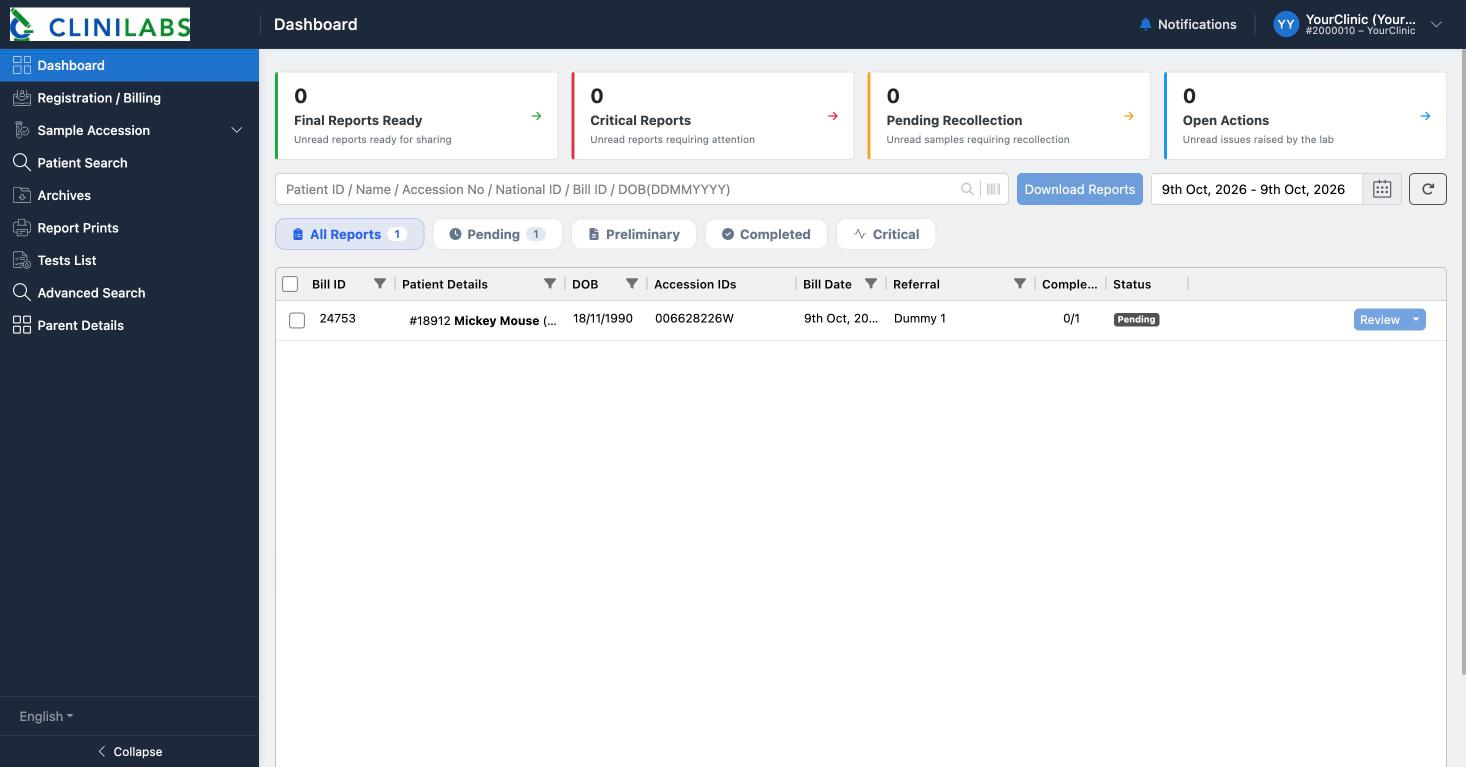
What each status means
| Status | Meaning |
|---|---|
| Pending | The order is placed, or the samples are with us, but no results are signed off yet |
| Preliminary | Some results are ready; others are still being tested |
| Completed | All results are signed off and the full report is ready |
The Completed column shows how many of the order's tests are finished, for example 2/3.
Use the buttons above the list to show only Pending, Preliminary, Completed or Critical orders. The number on each button tells you how many there are.
Finding older orders
Select the dates at the top right to choose This Month, Last Month or a Custom Range, then Apply. Completed reports are also in Archives.
Samples we couldn't test
If a sample can't be tested (for example it leaked, clotted or wasn't labelled) it appears under Sample Accession → Rejected Samples, and we'll contact you about a repeat. Redraw/Recollect Sample under Pending Collection lets you arrange a new sample.
How long will results take?
Each test's usual turnaround time is shown in Tests List in the portal (the Average TAT column). Routine blood tests are typically ready within a day or two of reaching us; specialist tests take longer.
Something looks stuck?
If an order hasn't moved for longer than you'd expect, contact us with the order number on 020 4525 8805 or at info@clinilabs.co.uk.